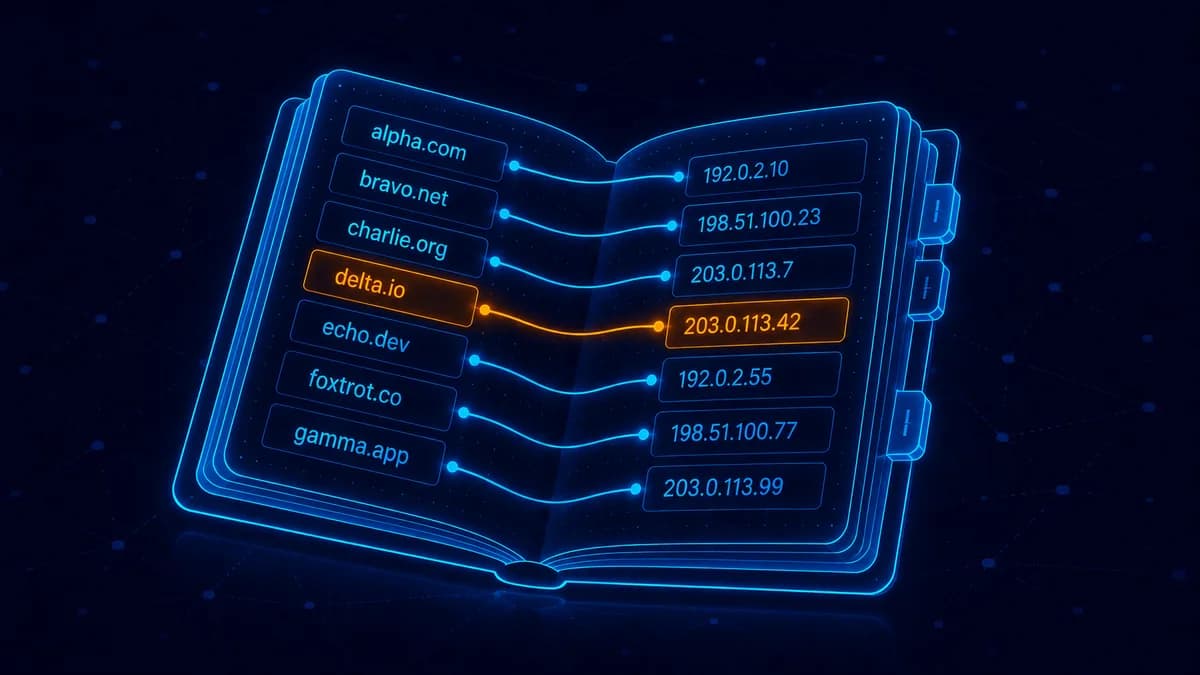
DNS is the address book of the internet. When you type acme.com in a browser, your computer doesn't know how to reach Acme's server — it asks DNS, which returns an IP address like 192.0.2.1, and then your browser connects to that IP. Every website you visit uses DNS, hundreds of times a day, invisibly.
For domain owners, understanding DNS unlocks everything from "why is my site down" to "how do I add custom email."
How DNS works (the 30-second version)
You type acme.com in the browser:
- Your computer asks its DNS resolver (usually your ISP, or Google
8.8.8.8, or Cloudflare1.1.1.1) - The resolver doesn't know the answer either, so it asks the root nameservers (operated globally, ~13 of them)
- Root nameservers say "for
.com, ask Verisign's TLD nameservers" - Verisign's TLD nameservers say "for
acme.com, askns1.acme.comandns2.acme.com" - Acme's authoritative nameservers answer: "the IP for
acme.comis192.0.2.1" - Your computer connects to
192.0.2.1and loads the site
This whole chain takes about 50-200 milliseconds. After the first lookup, your computer + ISP cache the result for 5 minutes to 24 hours (depending on TTL) so subsequent visits skip steps 2-5.
The records you'll actually deal with
When you manage DNS for a domain, you're editing these record types:
A record — domain → IP address
Most common record. Maps a domain to an IPv4 address.
acme.com.     A    192.0.2.1
www.acme.com. A    192.0.2.1
When you visit acme.com, your browser ends up at 192.0.2.1.
CNAME — domain → another domain
Used to alias one domain to another. Common for subdomains.
www.acme.com.  CNAME  acme.com
api.acme.com.  CNAME  acme.vercel.app
Visiting api.acme.com resolves first to acme.vercel.app, then to whatever IP acme.vercel.app resolves to.
CNAMEs cannot be on the apex domain (the bare acme.com without www). For the apex you need either an A record or an "ALIAS"/"ANAME" record (Cloudflare, Route 53, DNSimple support these).
MX record — domain → mail servers
Tells the world where to deliver email for @acme.com.
acme.com.  MX  10  mail1.googlemail.com
acme.com.  MX  20  mail2.googlemail.com
The number (10, 20) is the priority — lower = higher priority. If both mail servers are up, mail goes to mail1; if mail1 is down, mail goes to mail2.
If you use Google Workspace, your MX records point to Google's mail servers. Zoho Mail, Outlook, Proton Mail — each has their own MX setup.
TXT record — arbitrary text data
Used for verification, SPF (anti-spam), DKIM (email signing), DMARC (anti-phishing), domain verification (Google Workspace, Microsoft 365 ask you to add a TXT record to prove you own the domain).
acme.com.       TXT   "v=spf1 include:_spf.google.com ~all"
google._domainkey.acme.com.  TXT   "v=DKIM1; p=MIIBIjANBg..."
NS record — nameserver records
Lives at the registry level (set at your registrar). Tells the world which nameservers are authoritative for your domain.
acme.com.  NS  ns1.cloudflare.com
acme.com.  NS  ns2.cloudflare.com
When you "change nameservers," this is what's actually changing.
TTL — time to live
Every DNS record has a TTL (in seconds) that says how long the answer should be cached.
- TTL 86400 (24 hours) — typical default. Servers cache for a day, so your DNS infrastructure handles fewer queries.
- TTL 3600 (1 hour) — for records you might change soon.
- TTL 300 (5 minutes) — what to set 24-48 hours BEFORE a planned migration. Means rollback is fast.
Lower TTL = more queries (slight load increase) + faster propagation of changes. Higher TTL = fewer queries + slower change propagation.
Where to manage DNS
Your DNS lives wherever your nameservers point:
- Default: at your registrar. REXO HOST has a free DNS panel.
- Cloudflare: free, with global CDN bonus. Most popular choice for technical users.
- AWS Route 53: paid (~$0.50/month per domain), used in AWS-heavy setups.
- Your hosting provider's DNS: bundled with cPanel-style hosts.
Cloudflare vs registrar nameservers — which to use.
Common DNS gotchas
"My site moved to a new IP and visitors still see the old one"
DNS caching. Lower the TTL ahead of time, or wait it out (max 24-48 hours).
"My MX records are correct but email isn't arriving"
Check SPF + DKIM + DMARC. Email providers reject mail with missing or wrong auth records.
"My CNAME doesn't work on the apex domain"
That's a DNS spec restriction. Use ALIAS/ANAME (Cloudflare, Route 53) or A records pointing to your host's static IPs.
"DNS works on my phone but not on my laptop"
Different DNS resolvers cache different answers. Try dig acme.com from each network. Usually resolves itself in <1 hour.
Frequently asked questions
Do I need to understand DNS to own a domain?
Not really — most hosting setups configure DNS automatically. Understanding helps when something breaks.
Is DNS slow?
A first-ever DNS lookup takes 50-200ms. Cached lookups take <5ms. Modern browsers prefetch DNS for links on the page, hiding most of the cost. DNS is rarely a real performance bottleneck.
Can DNS be hacked?
Yes — DNS hijacking attacks exist. Defense: use DNSSEC (cryptographic signatures on DNS responses), and pick a registrar with strong account security (more on hijacking).
What's the difference between DNS and a domain registrar?
The registrar is who you BUY the domain from (REXO HOST). The DNS is the system that translates the domain to an IP address. By default the registrar provides DNS, but you can use any DNS provider you want.
How do I see my domain's DNS records?
Tools: dig acme.com any from a terminal, or web UIs like whatsmydns.net, intodns.com.
Get a domain with simple DNS
Search at REXO HOST — every domain comes with a free DNS panel. Add A, CNAME, MX, TXT records in 10 seconds. Or point nameservers to Cloudflare for the global CDN bonus.
Keep reading
What is Domain Squatting? How to Protect Your Brand
The different types of squatting (cyber, typo, brand-jacking), real-world examples, and your legal options if it happens to you.

What is an SSL Certificate (And Do You Need One)?
Plain-English guide to HTTPS, SSL/TLS certificates, and why every site in 2026 needs one — usually for free.

What is WHOIS Privacy and Do You Need It?
What WHOIS is, what gets exposed when you register a domain, and why privacy is essential for individuals.